

Use cases
With AI, scraping and search in the same sheet, most research tasks become “a list of names or URLs in column A, formulas in the columns after it”. Here are patterns that work well.
Company research
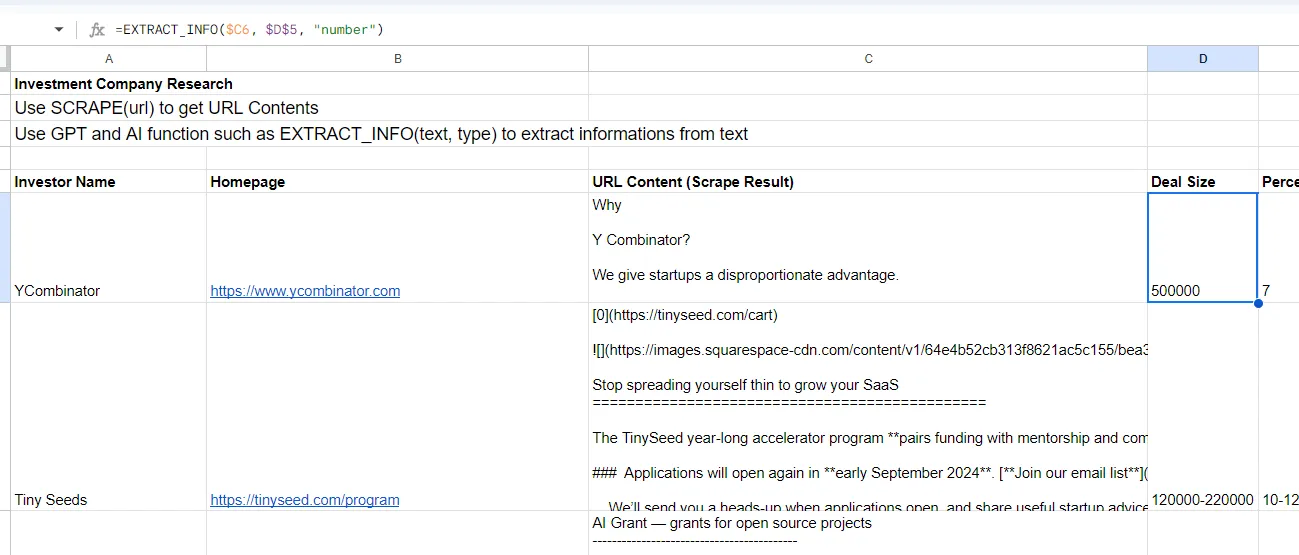
- Column B: company website.
- Column C:
=SCRAPE(B2)fetches the page as markdown. - Column D:
=EXTRACT_INFO(C2, "deal size", "number")pulls one field out of the text.
Add more =EXTRACT_INFO() columns for other fields such as “founder name”, “headquarters city” or “pricing model”.
Product and pricing research
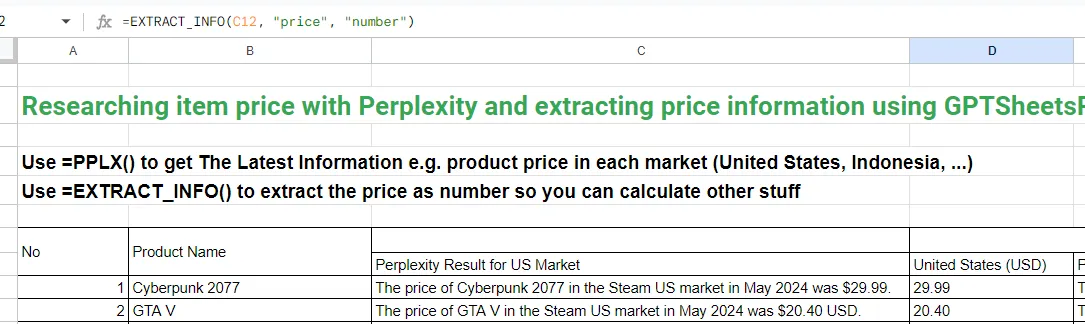
- Column C:
=PPLX("Current price of " & A2 & " in " & B2)gets a web-grounded answer with citations. - Column D:
=EXTRACT_INFO(C2, "price", "number")turns it into a number you can sort and chart.
For pricing pages that are public, scraping is cheaper and more exact: =EXTRACT_INFO(SCRAPE(B2), "price per month", "number").
Finding a document or link
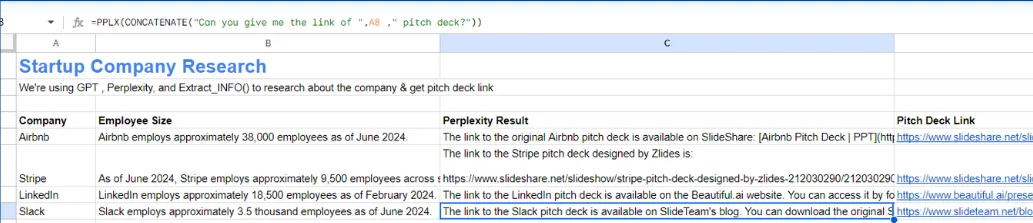
- Column C:
=PPLX("Link to " & A2 & "'s public pitch deck"). - Column D:
=EXTRACT_INFO(C2, "pitch deck link", "hyperlink").
Lead list from a search
=SERP_COMPANY("B2B payroll software", 25)in A2 spills 25 company URLs down column A.=SCRAPE_TITLE(A2)and=SCRAPE_DESCRIPTION(A2)in B and C give you a name and a one-line pitch per company.=EXTRACT_INFO(SCRAPE(A2), "contact email")in D finds a contact address when one is on the page.
Competitor monitoring
=SCRAPE_STATUS(A2)tells you whether a page is up (200) or gone (404).=SCRAPE_TITLE(A2)and=SCRAPE_DESCRIPTION(A2)catch messaging changes.=GPT(SCRAPE(A2), "List the pricing plans and prices mentioned, comma separated")summarizes a pricing page.
Scrapes are cached for 6 hours, so re-opening the sheet during the day does not re-fetch. To refresh tomorrow, recalculate or re-enter the formula.
Content and copywriting
=GPT6("Write a 50-word product description for: " & A2, "You are a copywriter for an outdoor gear brand")=Gemini4("Translate to Spanish, keep the tone: " & B2)=LIST_STUFF("blog post ideas about " & A2, 10)spills ten ideas down the column.
Data cleaning and classification
=GPT6mini(A2, "Normalize this company name. Reply with the name only, no suffix like Inc or Ltd")=Gemini35FlashLite(B2, "Classify this support ticket as billing, bug or feature request. Reply with one word")=EXTRACT_INFO(C2, "ISO country code")
Cheap models are more than enough here, and because responses are cached, re-running the same rows is free.
Tips for large sheets
- Fill a few hundred rows at a time. Google Sheets stops a custom function that runs for too long.
- Paste results as values when you are done so recalculation cannot change or re-bill them.
- Put a stable instruction in
system_promptand only the row data inprompt. That keeps prompts identical across runs, which makes the cache work for you.